Latest From My Blog

Showing posts with label Technology. Show all posts
Linux Connect
Executing following command in Linux terminal you can directly access your box.
ssh -i KEY File username@publicDNSname.amazonaws.com
ssh 
-i keypair.pem ubuntu@publicDNSname.amazonaws.com

Windows connect using Putty
PuTTY is a free and open source terminal emulator application which can act as a client for the SSH, Telnet, rlogin, and raw TCP computing protocols and as a serial console client. 

Step -1
First you have to download Putty.exe and PuttyGen.ext into your PC click here and download

Step 2
Run PuttyGen.exe click Conversions -> Import Key.

Step 3
Choose keypair.pem the Key Pair.

Step 4
In Parameters select Type of Key Generate SSH-1(RSA). Click Save private key.Same directory Puttygen will generate .ppk file (private key).

Step 5
Now run Putty.exe host name give Elastic IP or Public DNS name(If no elastic IP) and choose connection type SSH

Step 6
Authentication with private key. 
Category -> Connection -> SSH -> Auth browse and select .ppk file the click Open button.

Step 7
Instance cloud connected successfully. 

Execute following commands.
Update the Package
sudo apt-get update
Install Apache2
sudo apt-get install apache2
Install PHP5
sudo apt-get install php5
sudo 
apt-get install 
libapache2-mod-php5
Install MySQL
sudo apt-get install mysql-server libapache2-mod-auth-mysql php5-mysql
Install PhpMyAdmin
sudo apt-get install phpmyadmin
Restart Apache2
sudo /etc/init.d/apache2 restart
Now your web services is ready. You can upload your files into /var/www/ directory using FTP.
Access http://ElasticIP/. It works!
FileZilla - File Uploads
Using the open source FTP tool you can upload files into Amazon EC2 instance box. Download here and install into your PC.
Step 1
Select File-> Site Manager

Step 2
Give host name as your instance box Elastic IP and select Server Type SFTP-SSH File Transfer Protocol. Click OK not Connect

Step 3
Adding private key for instance cloud authentication. Edit -> Settings -> Connectin -> SFTP click Add keyfile button to browsed and choose existing .ppk file. Eg:keypair.ppk

Step 4
Now Got File-> Site Manager click Connect button.

Instance connected. Now you can upload files from local PC to Amazon EC2 Instance Cloud /var/www/ directory.

Connect Amazon instance cloud to Linux and Windows


Amazon EC2 instance only providing public DNS name, If you reboot existing instance box the public DNS name will change, using Elastic IP we can solve this problem DNS problem it's static.


STEP - 1 
Click on VPC under Compute & Networking menu,
STEP -2 
Click on Elastic IP on left menu
STEP -3
Clicking on Allocate New Address, amazon will provide you dedicated IP address.

STEP - 4
Amazon generated an IP address, now map IP address to Instance box (Eg:placmentprofession). While clicking on Associate Address button.

4 easy steps to map Elastic IP to AMAZON Instance


Getting started with Amazon Elastic Compute Cloud(EC2)
Amazon providing 720 hours free tier micro instance box. Very first you have to create an account in Amazon.com with valid credit card and then activate micro free tie. 
Click here to access Amazon console dashboard. 
STEP - 1
STEP - 2 
STEP - 3
STEP - 4
STEP - 5

STEP - 6

STEP - 7
STEP - 8
STEP - 9
STEP - 10

10 Steps to create AMAZON EC2 instance easily

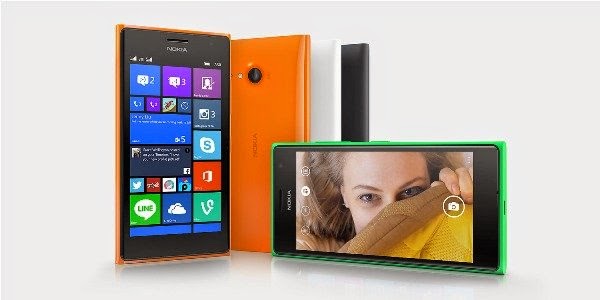
Nokia Lumia 730, the selfie phone

  1. Smart Phone with 5MP wide – angle front camera so you can squeeze in more people in the same frame.
  2. It has a Dual SIM handset supporting 3G connectivity.
  3. It also has a number of filters, so that you get additional effects (for Instagram photos).
  4. It has a 4.7- inch 720p screen with Nokia’s clear Black display technology, so you get pretty colour.
  5.  It has a 8.1 OS , 1.2GHz quad-core Snapdragon 400 processor, 1GB RAM, 8GB internal storage and microSD card support up to 128GB.
  6. It throws in 15GB of OneDrive cloud storage as well. Connectivity features include Wi-Fi, Bluetooth 4.0, NFC and microUSB. Like all Lumia family member you get free voice guided navigation and offline maps with the help of Nokia HERE maps service. The company claims that the user removable battery will last for 25 days on standby and offer 22 hours of talk time.

Price
We can expect the prices to hover around Rs. 16000 and Rs. 18000 respectively.
Overall Comments
Best suits for those who love to take selfies.


Nokia Lumia 730, the selfie phone

10 Useful Apps in Apple Watch

1.     Facebook
Facebook is the one of the best application in Apple Watch. In this user can scroll news feeds and post their post also.
2.     Twitter
In this use can see their tweets and also user can retweet the status (Limit 140 character).
The Apple Watch features a Twitter app that shows a full background image overlaid with the user's tweet.
3.     City Mapper’s(GPS)
           The City Mapper app for the Apple Watch features notifications for when you arrive at your destination, schedules and directions to train and bus stops.

4.     BMW app
A BMW app for Apple Watch will allow owners of the manufacturer's electric vehicles to see what percentage of battery life remains. And can also help navigate them to their car.
5.     Honeywell thermostats
Control from Anywhere - Honeywell's reliable and highly-rated app allows you to program your thermostat from Apple watch, whether you're across the room or around the world
6.     Lutron
The Lutron app can control your home's lighting via the Apple Watch.
7.     Nike
The Nike app for Apple Watch features the ability to challenge friends and track your run.
8.     American Airlines
The American Airlines app lets you know how much time until your plane starts boarding.

9.     Starwood Hotels

Opening your hotel room door with a waive of your wrist?

10.  Major League Baseball
Live baseball scores are featured in the MLB app for Apple Watch.
11.  Pinterest
The digital scrapbooking site developed an Apple Watch app that’s able to remind you when you’re near a “pinned” site, and also give walking directions to it. Apple did not say whether users would be able to “pin” images or other content from the Watch app.

Apple Watch Features: 10 useful worth Application

+